
Free trial
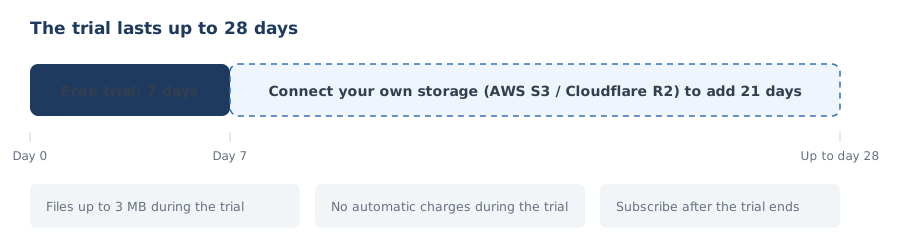
You can try DioTrans free for 7 days after sign-up. Completing AWS S3 or Cloudflare R2 setup extends the trial by 21 more days, up to a maximum of 28 days.
Files are limited to 3 MB during the trial. Trial conditions apply as of the time of registration; changing environment variables later does not change the conditions of existing users.
No payment details are required during the trial. When the trial ends, you are not charged automatically. To keep using DioTrans, subscribe to a paid plan. If you subscribe during the trial, billing starts on the registration date (the contract date) and the first charge is made then.
Billing and auto-renewal
Paid plans are billed monthly in advance. The registration date is the contract date, and you are charged automatically on the same day each month. For example, if you subscribe on the 3rd, the next billing date is the 3rd of the following month (billing dates differ per user). The contract renews automatically.
Payment is by credit card through Stripe Checkout. Available card brands and similar details are shown on the payment screen.
Displayed prices exclude tax. Tax is added to the billed amount based on the applicable rate at the time of billing, calculated automatically by Stripe according to each country’s tax rules.
Changing the upload destination plan
You can change the upload destination plan (your own storage / DioTrans R2) after subscribing from “Manage payment details” (the Stripe customer portal) in the app settings.
Stripe calculates the difference on a prorated basis and reflects it in your billing (whether it is applied immediately or at the end of the period follows your Stripe configuration).
Transfers you have already created keep referencing the storage destination they were created with, so recipients can still download them until the download expiry. The new plan applies to transfers created after the change.
However, if the destination is your own storage (AWS S3 / Cloudflare R2), transfers become unavailable even before the expiry if you cancel the storage contract or delete its bucket or credentials. The files are kept only in your storage, and DioTrans has no copy, so they cannot be recovered. This also applies after switching to the DioTrans R2 plan.
You can change your payment method from “Manage payment details” (the Stripe customer portal) in the app settings.
Cancellation
You can cancel at any time from “Manage payment details” (the Stripe customer portal) in the app settings.
After cancellation, no further automatic renewal occurs from the next billing date. You can keep using the service until the end of the current billing period.
Transfers created before cancellation remain downloadable until their download expiry. However, transfers that used your own storage become unavailable within their validity period if you cancel or delete that storage.
Refunds
We do not prorate or refund mid-period cancellations. If you cancel, the remaining time until the next billing date is not refundable.
However, if there is an obvious billing error such as a duplicate charge, contact support@diotrans.app. We will check and respond.
Failed payments
If a payment fails, there is no grace period. Stripe retries automatically, but some features such as file transfers are suspended until the payment completes.
Once payment is completed, the service is restored promptly.
Service availability
DioTrans has been available since October 1, 2026. After plan registration and payment complete, you can use the online service immediately.
Contact
For billing questions, contact us through Support.